Any browser. Any host. Any OS. Open source
Typescript
like JavaScript but with no surprises
- developed in 2012 by Microsoft
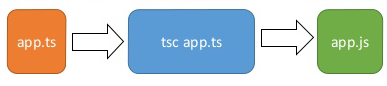
- compiles to plain JavaScript
- starts and ends with JavaScript
- strict syntactical superset of JavaScript
- adds optional static typing
- strong tools for large apps
- support for the latest and evolving JavaScript features
How does TypeScript improve JavaScript?
- brings to JavaScript a type system
- strictly defines what a given variable can contain
Advantages
- Introduces optional static typing
- Early spotted bugs
- Predictability
- Readability
- Rich IDE support
- Fast refactoring
- Power of OOP
- Cross-platform and cross-browser compatibility
- Support from the tech world
Disadvantages
- Not true static typing
- Bloated code
- Adding extra step — transpiling
Installing
- Via npm (the Node.js package manager)
- By installing TypeScript’s Visual Studio plugins
For NPM users:
npm install -g typescriptHow to use TypeScript& ?
In your editor just type TypeScript code in
greeter.tsCompiling your code
At the command line, run the TypeScript compiler:
tsc greeter.tsthe result will be a file greeter.js which contains the same JavaScript that you know well
Types
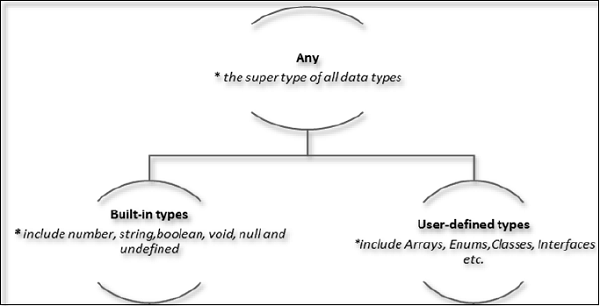
Any type
				let notSure: any = 4;
    notSure = "maybe a string instead";
			 notSure = false; // okay, definitely a boolean
			 let list: any[] = [1, true, "free"];
			 list[1] = 100;
Built-in types
							let isDone: boolean = false;
							let fullName: string = `Bob Bobbington`;
							let u: undefined = undefined;
							let n: null = null;
							function warnUser(): void {
								console.log("This is my warning message");
							}
Never
- indicates the values that will never occur
						function throwError(errorMsg: string): never {
						 throw new Error(errorMsg);
		        }
Union
						let empId: string | number;
						empId = 111; // OK
						empId = "E111"; // OK
						empId = true; // Compiler Error
Enum
- allows to declare a set of named constants, a collection of related values
- can be used as a function parameter or return type
						enum PrintMedia {
						 Newspaper = "NEWSPAPER",
						 Newsletter = "NEWSLETTER",
						 Magazine = "MAGAZINE",
						 Book = "BOOK"
						}
						// Access String Enum
						PrintMedia.Newspaper; //returns NEWSPAPER
						PrintMedia['Magazine'];//returns MAGAZINE
Array
- declaration with using square brackets
- Using a generic array type, Array<elementType>
							let list: number[] = [1, 2, 3];
							let list: Array <number> = [1, 2, 3];
Tuples
						  // Declare a tuple type;
           let x: [string, number];
        // Initialize it;
           x = ["hello", 10]; // OK
       // Initialize it incorrectly;
          x = [10, "hello"]; // Error
          Type 'number' is not assignable to type 'string'.
          Type 'string' is not assignable to type 'number'.
Function
- can be named or anonymous
- have an optional parameter functionality
- arrow function
						function Greet(greeting: string, name: string ) : string {
						  return greeting + ' ' + name + '!';
						}

						let sum = (x: number, y: number) => x + y;
Typescript interface
- used to define a type and also to implement it in the class
- used to define a type of a function. This ensures the function signature
- used to define the type of an array where you can define the type of index as well as values.
- can have optional properties, marked with a "?"
- can extend one or more interfaces
- can be implemented with a Class
Example of TS interface
						interface IEmployee {
							empCode: number;
							empName: string;
							empDept?:string;
						}

						let empObj1:IEmployee = {  // OK
							empCode:1,
							empName:"Steve"
						}

						let empObj2:IEmployee = {  // OK
							empCode:1,
							empName:"Bill",
							empDept:"IT"
						}
Classes
						class Animal {
						 name: string;
						 constructor(theName: string) {
							this.name = theName;
						 }
						 move(distInMeters: number = 0) {
							console.log(`${this.name} moved ${distInMeters}m.`);
						 }
						}

						class Snake extends Animal {
						 constructor(name: string) {
							super(name);
						 }
						 move(distInMeters = 5) {
							console.log("Slithering...");
							super.move(distInMeters);
						 }
						}
Abstract Classes
- mainly for inheritance
- can include abstract methods and property
						abstract class Person {
						 abstract name: string;
						 display(): void{
							console.log(this.name);
						 }
						}

						class Employee extends Person {
						 name: string;
						 empCode: number;
						 constructor(name: string, code: number) {
						 super(); // must call super()
						 this.empCode = code;
						 this.name = name;
						 }
						}
						let emp: Person = new Employee("James", 100);
						emp.display(); //James
Data Modifiers
- public by default
- private - visible only to the class
- protected - can be accessed using their deriving classes
						class Employee {
							private empCode: number;
							empName: string;
						}

						let emp = new Employee();
						emp.empCode = 123; // Compiler Error
						emp.empName = "Swati";//OK
Modules
- used to organize and maintain a large code base
- way to create a local scope in the file
- prevent global variable naming collision
- can be created using the keyword export
- can be used in another module using the keyword import
Generic
- allows to build reusable components
- components can be called or used with a variety of data types
					function getArray <T>(items : T[] ) : T[] {
					  return new Array <T>().concat(items);
					}

					let myNumArr = getArray <number>([100, 200, 300]);
					let myStrArr = getArray <string>(["Hello", "World"]);
					myNumArr.push(400); // OK
					myStrArr.push("Hello TypeScript"); // OK
					myNumArr.push("Hi"); // Compiler Error
					myStrArr.push(500); // Compiler Error
Conclusion
TypeScript's getting better all the time. As for 2020 it's among the top ten most wanted programming languages, according to GitHub Google made it the primary language for developing Angular apps. All things considered, TypeScript is a fantastic tool for JavaScript developers. It makes working on larger projects easier and provides a better code-writing toolkit that can greatly improve your software development process. TypeScript is popular, trusted by the biggest players in the industry, and not as difficult as many seem to believe.